



Makeen Cryo
Dedicated cryobank
Manage sperm, oocyte, embryo and ovarian tissue stock, from its storage location to the latest recorded sample action.
No matching features. Try a procedure name or its abbreviation.
Patient files and batch intake
Patient and partner files
Search by name, file number or identity details before opening a new file. Enter a birth date or year and contact details, then link an existing or new partner file. Either file provides access to the other partner and their recorded procedures, subject to permissions.
Receiving a batch
Select a patient and specimen type, then save a separate batch with its date and storage location. Externally transferred sperm has a dedicated intake route for the sending centre and transport details. Reopen batch documents from the patient record.
The four specimen registers
Sperm cryopreservation
Open a batch for an ejaculate, an FNA or TESE specimen, or material received from another centre. Record the date, vial count, location and freezing operator. An already-frozen batch can also be added to the register. Each batch keeps its original quantity beside the number of vials still in storage.
Oocytes by straw
Enter the oocyte count and freezing date, then allocate oocytes to numbered straws with a colour, position and count per straw. When a straw leaves storage, the record preserves the number of oocytes removed and the balance remaining in the batch.
Embryos and biopsy details
Record the embryo count, freezing day and individual grades at straw level. Where a biopsy was performed, enter the embryo number, biopsy type, day and result, or complete the result later. The register preserves the allocation of embryos to straws and locations.
Ovarian tissue
Create a tissue batch with its collection date, freezing date and origin. For a specimen received from outside, record the sending centre. Add the vial count and storage position. The register then follows subsequent use, transfer or disposal of the vials.
Storage layout and occupancy
Tank, can and sleeve
Build a location tree to match the laboratory’s physical layout. Set the number of cans in each tank and sleeves in each can, the permitted specimen type and the capacity where known. Select the same registered location when entering a straw or batch of vials.
Occupancy and available capacity
Select a sleeve to see its occupied positions and the vials or straws assigned to it. A configured capacity also shows the space available. New placements are checked against specimen type and capacity. Unmatched locations can be reviewed against older records.
Stock movements and renewals
Specimen actions and balances
Open a batch to record use, transfer to another centre or disposal, with the date, quantity and reason. The action updates the balance and remains in the history. Eligible actions can be reversed with a recorded reason and the corresponding quantity restored.
Selecting stock for an action
For sperm or ovarian tissue, choose the number of vials affected. For embryos and oocytes, select the individual straws and their contents are accounted for on removal. Each action preserves its date and quantity and the register shows when a batch was exhausted.
Storage renewals
Renewal accounts group a patient’s batches by specimen type and storage period. Review the years due, record a renewal against the relevant year, then revisit paid years, outstanding renewals and the end date of a closed storage period.
Summaries, documents and exports
Patient cryostorage summary
Choose one specimen type or all types in a patient file. The summary brings together batch and freezing dates, original and remaining quantities, locations and recorded actions. Print a consolidated summary or save it as a PDF.
Filterable cryobank export
Select a month or custom date range and a freezing procedure. The detailed cryostorage register includes the batch, straw or container, location and freezing operator. Embryo rows also provide the embryo identifier, number, grade and freezing day. Export the table to Excel or CSV.
Workload and cryobank worksheets
Review cryobank workload by procedure, period and recorded team. The document centre provides ten printable worksheets, including receipt, freezing, warming, consent checks and referrals. Print a blank worksheet or populate it for a selected patient.
Sample identity and bank settings
Sample identity and label history
Find the patient or procedure record, select the label and container type, then generate and print the label. Reopen it by code or compare source and destination codes to check their record links. The check history shows the result, operator and time.
People and access permissions
Open Settings after Sample ID to manage physicians, employees and user accounts. Assign responsibility for viewing, editing, approving, printing and exporting records, and control access to storage-location and centre settings.
Backups and institution branding
Choose an external backup folder and password, run a backup manually or enable daily backups while the application is running. Review the backup details before restoration. Institution settings control the bilingual centre and unit names, logo, report header and footer.
Workstation configurations
Use Standalone on a single computer, or the Clients edition to connect centre workstations to their host. In a centre setup the workstations connect to the shared centre data, and each staff member accesses records through their own account and permissions.
Inside the workspace
All screenshots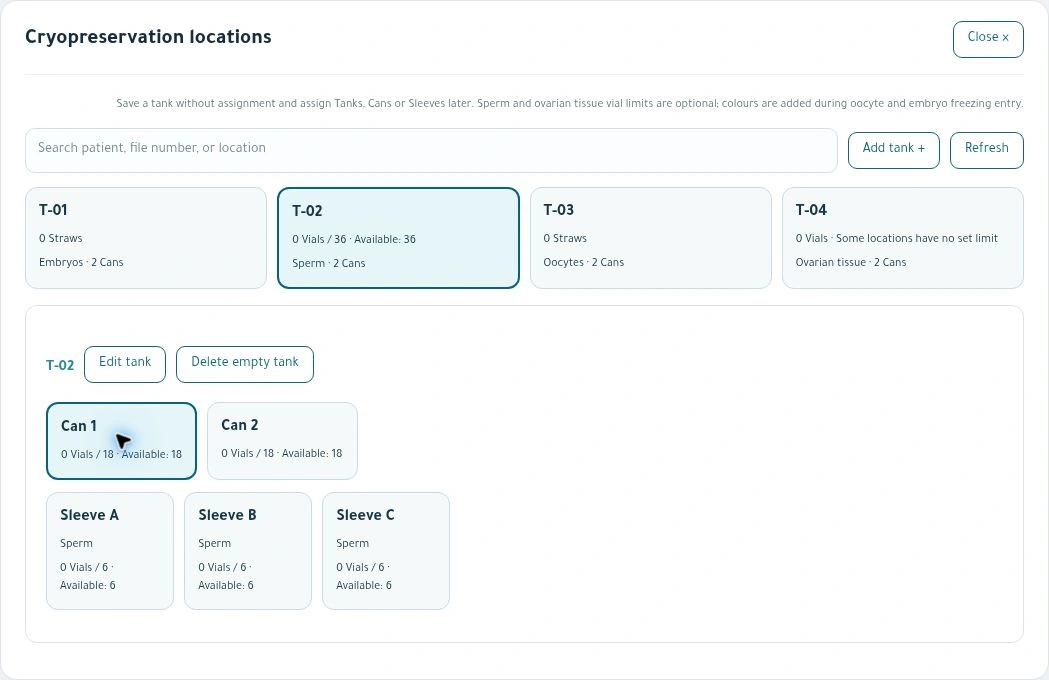
Cryostorage locations
Trace a storage location through its tank, can and sleeve.
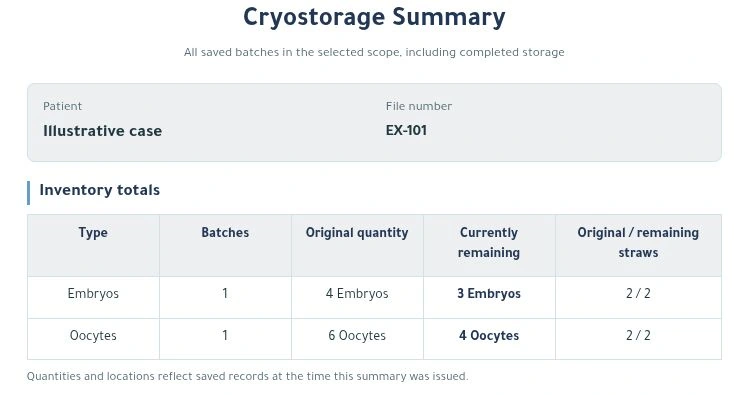
Patient cryostorage summary
Review batches, straws and the original and remaining quantities of embryos and oocytes in the patient file.
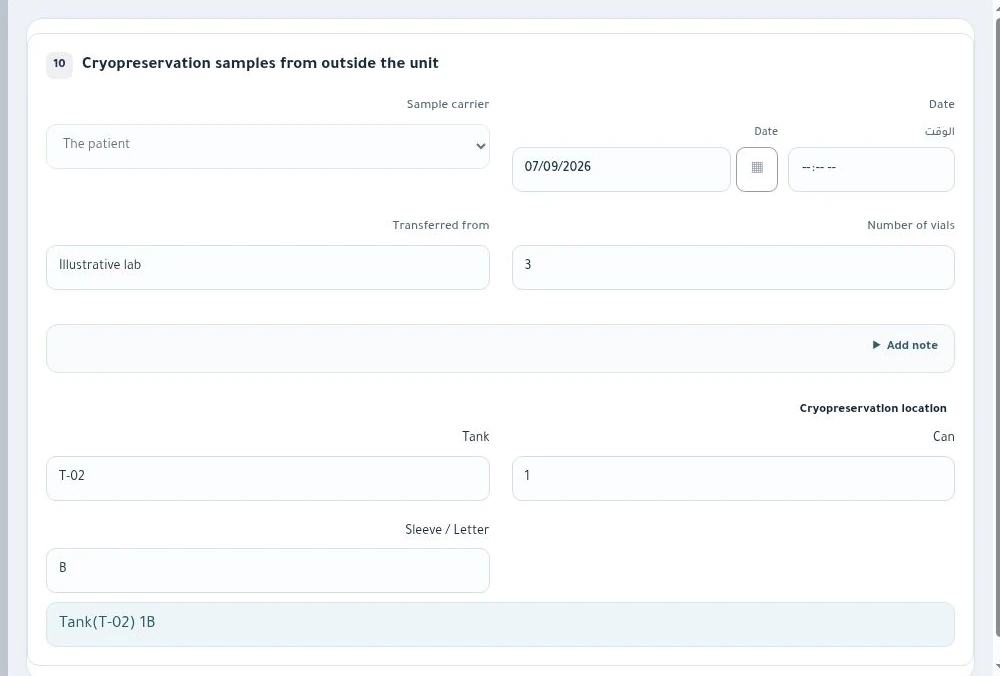
External specimen intake
Record the carrier, sending facility, intake date, vial count and storage location.
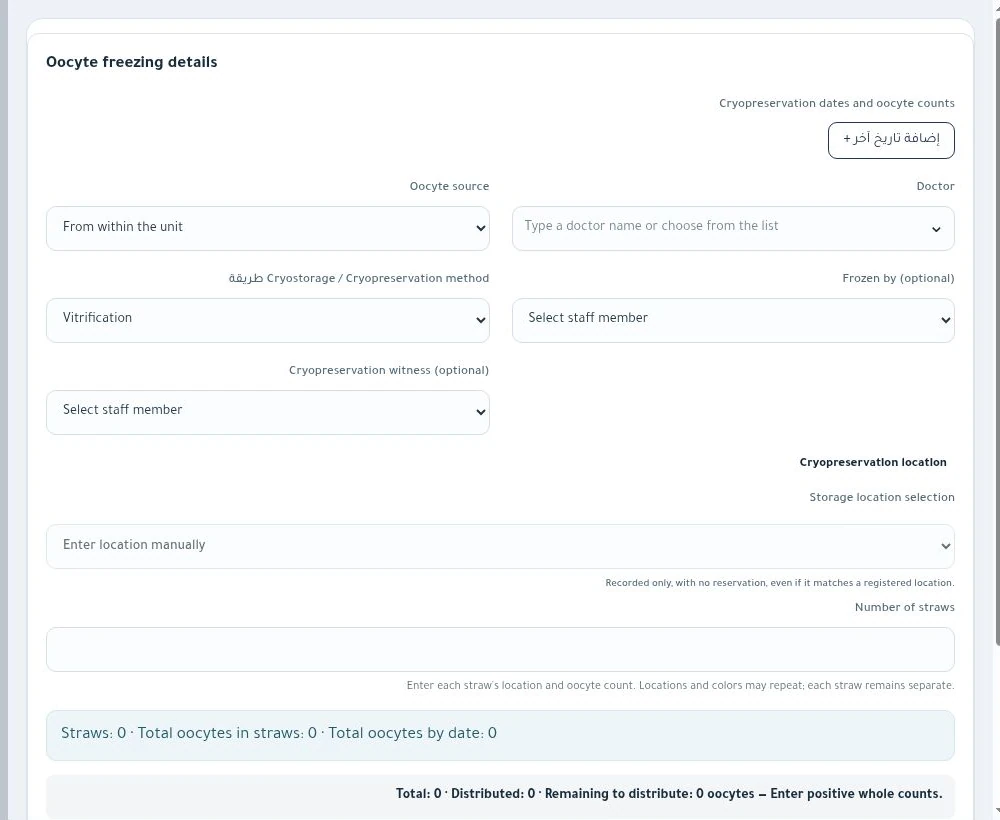
Oocyte freezing entry
Register oocyte batches, source, freezing method and straw allocation.
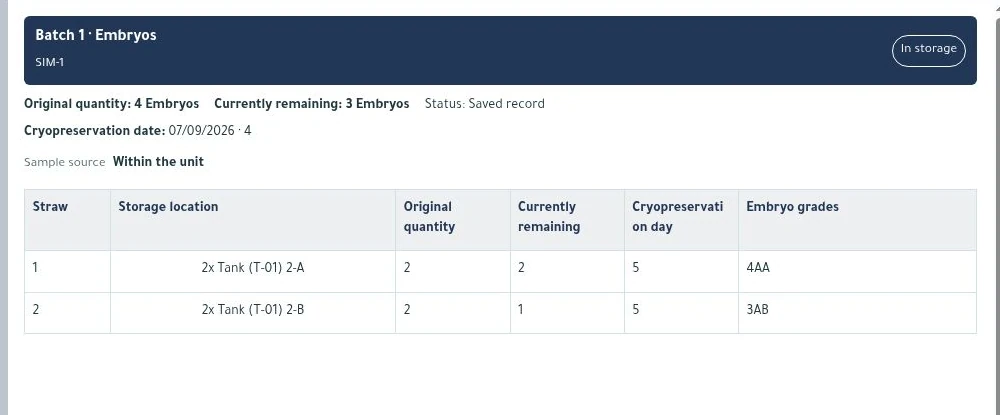
Straw-level balances
Review straw locations, original and remaining embryo counts, grades and freezing day.

Specimen action history
Review the dated action, quantity, remaining balance and affected straw.
Catalogue Makeen Cryo
Save a reference copy for your laboratory team in either language.